Headless CMS Implementation Guide for Growth
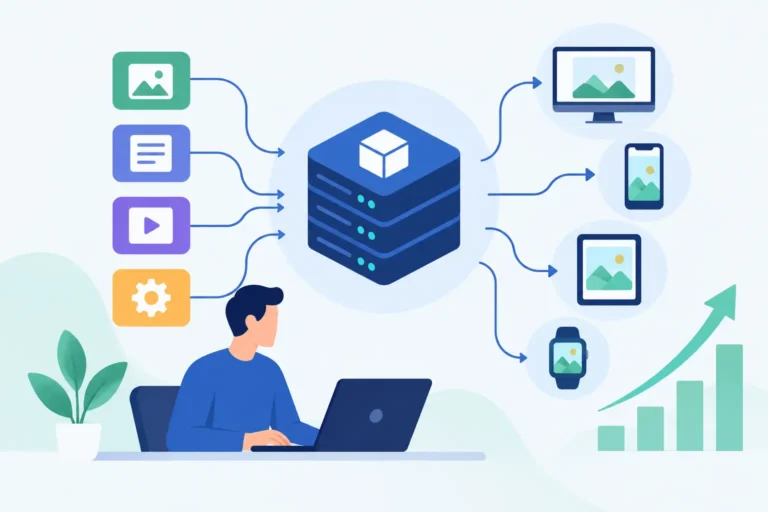
A headless CMS can give a growing business more freedom to publish across websites, apps, customer portals, and commerce experiences. But it is not a shortcut to a better digital presence. This headless CMS implementation guide focuses on the decisions that determine whether the investment improves speed, flexibility, and operational efficiency or creates unnecessary complexity for your team.
A traditional CMS combines content management and front-end presentation in one platform. A headless CMS separates them. Your team creates and manages content in a central system, while a custom website, mobile app, or other digital channel retrieves that content through an API.
That separation is valuable when your business needs more than a standard marketing site. It also changes how content, design, development, integrations, and quality assurance need to work together.
Start With the Business Case, Not the Platform
A headless approach makes sense when it supports a clear operational or growth objective. For example, a retailer may need product content delivered consistently to a storefront, mobile app, and in-store display. A multi-location business may need regional teams to update approved content without disrupting site design. A SaaS company may need documentation, campaign pages, and in-product content managed from connected systems.
For a straightforward brochure site with a small marketing team, a well-built WordPress, Webflow, or Framer site may be the more practical choice. Those platforms can provide excellent editing experiences, fast performance, and lower implementation overhead. Headless architecture is not automatically more advanced in a way that benefits every business.
Before selecting technology, define what success looks like. Is the goal to shorten publishing cycles, support multiple channels, improve site performance, connect content to commerce data, or reduce repeated content work? A clear answer keeps the project focused on measurable value rather than architecture for its own sake.
Define Content Before Designing Components
The most common implementation mistake is treating a headless CMS as a blank database and building content models after the front end is already underway. That usually leads to rigid page structures, confusing editor fields, or development rework.
Start by auditing the content you have and the content you expect to create. Identify the recurring building blocks across your digital experience: pages, landing pages, articles, team profiles, services, locations, case studies, products, FAQs, and calls to action. Then distinguish between content that should be reusable and content that is unique to a single page.
Build models around real editorial tasks
A useful content model reflects how your team works. A marketing manager should be able to create a new service page without asking a developer to rearrange fields or modify code. At the same time, editors should not have unlimited freedom to create layouts that conflict with the brand system.
For example, a case study model may include a client name, industry, challenge, solution, outcomes, featured image, related services, and quote. These fields make content consistent, support filtering and reuse, and give the design team predictable data to work with.
Avoid putting every possible option into a single generic content block. Flexible modules are helpful, but too much flexibility creates inconsistent pages and slows editorial decisions. The right balance depends on who publishes content and how often.
Establish relationships and reusable content
Plan for connections between content types from the beginning. A service can relate to case studies. A location can relate to team members and local landing pages. A product can relate to categories, promotions, and support materials.
This structure improves the visitor experience and makes future expansion easier. It also reduces duplicate entries, which matters when brand messaging, pricing details, or compliance language must stay accurate across many pages.
Choose a Technical Architecture That Fits Your Team
The CMS is only one part of the solution. A successful implementation also requires decisions about the front-end framework, hosting, APIs, authentication, search, forms, analytics, image delivery, and third-party integrations.
Your architecture should reflect your internal capabilities and support expectations. If your team needs a custom front end and frequent integration work, a composable approach can be a strong fit. If your priority is rapid campaign publishing with limited technical administration, a more integrated platform may deliver a better return.
Performance should be designed in, not added after launch. The front end should use caching, optimized images, efficient API queries, and appropriate rendering strategies. Static generation can make many marketing pages exceptionally fast, while dynamic rendering may be necessary for personalized dashboards, inventory availability, or member-specific content.
Security also needs early attention. Define who can access the CMS, which roles can publish content, how API keys are stored, and how preview environments are controlled. A headless setup can reduce certain risks by separating the public website from the editorial system, but only when permissions and integrations are managed carefully.
Use a Phased Headless CMS Implementation Guide
A phased delivery process helps business leaders retain visibility while allowing technical decisions to be validated early. Instead of waiting until launch to discover whether editors can use the CMS or whether an integration performs reliably, test the highest-risk parts first.
1. Discovery and requirements
Document business goals, audiences, current systems, content operations, required integrations, and future channels. This is also the time to identify stakeholders and decide who has final approval on content models, visual direction, and technical scope.
2. Content modeling and UX planning
Create content types, fields, relationships, workflows, and governance rules alongside wireframes and component plans. Editors should review the CMS structure before full development begins. Their feedback is often the fastest way to expose missing fields or impractical publishing steps.
3. Development and integration
Build the front end, configure the CMS, connect APIs, and create reusable components. Development should include a preview process so content teams can see changes before publishing. For commerce, CRM, booking, or personalization integrations, test real data flows early rather than relying on sample content alone.
4. Quality assurance, migration, and launch
Test on current browsers and devices, validate forms and conversion paths, review metadata, confirm redirects, and check page performance. Migration deserves dedicated time, especially when moving years of articles, product records, or location pages. Automated migration can save time, but imported content still needs editorial review.
5. Training and optimization
Launch is the beginning of operational ownership. Train editors using the actual tasks they will perform, such as publishing a campaign page, updating a service, or scheduling a promotion. Then track page speed, search visibility, conversion behavior, error logs, and editorial bottlenecks to guide improvements.
Plan Governance Before Content Scales
Headless CMS projects often succeed technically but lose value when governance is unclear. Without defined ownership, teams can publish outdated messaging, create duplicate entries, or bypass approved workflows during a fast campaign cycle.
Set practical rules for naming, content status, approvals, publishing roles, asset usage, and archival. Decide which content requires review by legal, product, regional teams, or brand leadership. For larger organizations, establish a shared component library and documentation so new teams do not recreate existing patterns.
Governance should support momentum, not create unnecessary bureaucracy. A simple approval process for a small marketing team may be enough. An enterprise with multiple regions, products, and compliance requirements will need more structured permissions and publishing controls.
Measure Results Beyond a Successful Launch
A polished site is not the final metric. Measure whether the new system is helping the business publish faster, reduce developer dependence, improve visitor engagement, or increase qualified conversions.
Track technical indicators such as page speed, uptime, API response times, and publishing errors. Pair them with business indicators including organic traffic, form completion rates, commerce conversion, content production time, and the number of channels supported from the same content source.
If publishing still requires repeated developer intervention, the content model may need refinement. If editors are overwhelmed by options, the CMS interface may need clearer guidance. If performance declines as the site grows, caching or API queries may need attention. A future-ready implementation is one that can be improved without rebuilding from scratch.
The best next step is to map one real customer journey and one real publishing workflow before committing to a platform. When the technology supports both, a headless CMS becomes a practical foundation for growth rather than another system your team has to work around.